

How to Successfully Launch an Immersive Classroom in Higher Education
8th July 2026
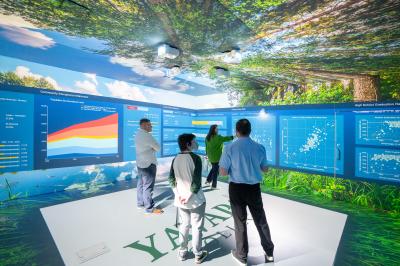
When Yavapai College first discovered immersive environments, it wasn’t part of a long-term procurement plan or a multi-year pilot programme…
At Igloo, we’ve been installing immersive classrooms for over 15 years.
In that time, we’ve installed immersive experiences for institutions of all kinds, from primary schools to colleges, K-12, and universities.
We’ve also been recognised for our installations, winning 8 HETMA Higher Ed Awards, Education Project of the Year at the AV Awards, and Best Education Solution at the XR Awards over the past 3 years.
A big part of our success over the years has been understanding the requirements of educators to show a wide variety of content, and to work with all the digital tools that students will use as they enter the world of employment.
In fact, the question we hear the most is 'What content can I show in my Igloo immersive classroom?'
The short answer?
A lot.
You can view almost any web-based application, a large number of external software tools integrated natively into Igloo Core Engine (our software platform for immersive spaces), as well as free tools and in-house content.
The long answer?
To give you that, it’s probably best to split it into sections. So, read on to see just how much content you can show in your Igloo Core Engine-powered immersive classroom.
.jpg)
Web-based applications
The most common form of content shown in Igloo immersive spaces, web-based content, is one of the most accessible and intuitive ways to get great immersive content running quickly. And, Igloo Core Engine has been built from the ground up to work with almost any web-based application.
Our built-in WebViewer allows you to browse the internet and load any 360° (or regular two-dimensional) content natively in your immersive classroom. We often see educational users use Google Street View to instantly transport students to any corner of the world on a virtual field trip, or YouTube 360° to take video content to a new, immersive level, whether it’s drone footage of the Pyrenees, incredible Go Pro footage of sport, or educational deep dives where you surround students in the content.
If it’s on the web, chances are you can view it in your Igloo immersive space.
.jpg)
Google Street View running in an Igloo immersive space
Industry-leading number of integrations
Igloo Core Engine has been built from the ground up to work with as many external programs, tools, and software as possible. As we continue to work with more education clients, we work diligently with them to ensure the tools they use work seamlessly in Igloo Core Engine.
One such example we commonly see educators use is game engines. For instance, Unreal and Unity can be used to model 3D environments or digital twins of locations that would otherwise be inaccessible or hazardous to students.
Autodesk is another extremely popular integration, providing immersive opportunities for engineering, manufacturing, and other STEM students. Conversely, Matterport and VCOG allow students of all kinds to experience highly detailed environments as though they were standing in them.
Our software also supports your everyday programs, such as Microsoft Office, Teams, Zoom, Miro, Google Drive, and many more, elevating these educational tools to new immersive heights, heightening student engagement and retention.
.jpg)
V-COG, an advanced visualisation tool for digital twins
Free online tools and downloads
Even if you don’t have specialist tools, there are plenty of free online tools and downloads that are compatible with Igloo Core Engine.
SketchFab and TurboSquid are hosting sites for free-to-download 3D models of almost anything, including cultural landmarks like the Notre Dame Cathedral, anatomical models of the human body, and detailed views of scientific discoveries and spacecraft.
If you want fully rendered skyboxes and larger environments, tools like Polyhaven provide high-resolution 3D assets that create excellent backdrops for immersive learning, breathing new life into your subject matter.
And, because your Igloo Core Engine-powered space comes equipped with Igloo Model Viewer, you can view these natively in your system, as well as manipulate viewing angle, size, and lighting conditions.
Gaia Sky is one of our newest integrations and one with which we worked closely with extensive users of the tool, Marie and Louis Pasteur University, Besançon, to integrate. An incredibly powerful tool, it uses a roaming satellite to map essentially the entire universe, which you can then traverse and view the orbit of planets and stars in real time.
But if it’s something simpler you’re after, then you can use more basic tools like Unsplash for royalty-free imagery, all taken to new heights in your immersive space.
.jpg)
Gaia Sky, now compatible with Igloo Core Engine
Student and in-house created content
There’s no better content to get than your own. We’ve seen incredible content made by clients and students alike that is brought to life by Igloo; the possibilities really are endless.
One of the most effective uses of in-house content is 360° video. Recently, our friends at Sunderland College showed us a brilliant 360° video of a walkout to the centre circle at the Stadium of Light, right before kick-off. When viewed in an immersive space, the atmosphere and noise of the stadium become more palpable than ever, and that childhood dream of representing your football club feels ever closer.
If you’re already using digital tools like Autodesk or Unity, you can showcase student content created in these programs in your immersive environment. Whether it’s assessed work or simply to provide feedback, you can analyse and convey your message to students instantly, face-to-face.
Another common use of our immersive spaces has been to provide campus tours to both new and prospective students. Perhaps your organisation is spread over multiple sites or regions, and you want to give the full experience of campus life on open days. With Igloo Core Engine, you can.

Student-created geological models being analysed
The Igloo opinion
This is not an exhaustive list and is intended as a flavour of some of the content you can show in an Igloo Core Engine-powered immersive space.
As the wealth of content on the internet grows exponentially, you get consistent new ways to use your Igloo, free of charge.
Additionally, we have designed Igloo Core Engine to work with as many of the digital tools you use today, so it fits neatly into the curriculum, making it easy to use for teachers and easy to understand for students.
And, if there’s a digital tool that you want to use in your Igloo immersive room that we haven’t got round to yet, we’ll work closely with you to get it working natively.
To find out more about Igloo immersive classrooms and what content you can show in them, get in touch with us today.
 From watching to doing – how Sunderland College makes immersive learning interactive
 Design the experience, not just the content – lessons from UWTSD
 LASTING System and Igloo Vision sign an exclusive distribution agreement for Southeast Europe
 How Igloo helped deliver narrative gaming experiences at Sheffield DocFest
 How to Successfully Launch an Immersive Classroom in Higher Education
 Are immersive rooms easy to use?
Categories: Education
8th July 2026
When Yavapai College first discovered immersive environments, it wasn’t part of a long-term procurement plan or a multi-year pilot programme…

3rd September 2025
Tomorrow’s classrooms will look completely different to today’s.As the way young people consume information changes, the way in which…
6th January 2025
Training is an essential part of any business – ensuring safety, optimising operations, and extending best practices across the board.Yet all…